

Plugin description
MiningRewards lets you reward players for mining selected blocks on Spigot and Paper servers. Create and customise rewards through an in-game menu, with the settings you need in one place.
Rewards can give items, money, XP, potion effects and enchantments. They can also run commands, repair tools, replace or transform blocks, mine connected ore veins and scan nearby terrain. Use Mining Shield for temporary protection or Auto Pickup to send mined drops straight to the player’s inventory.
✅ Reward Creation & Management
✅ 20 Reward Types
Choose from the following reward types:
✅ Reward Conditions & Chance Control
✅ Global Settings & Anti-Abuse Protection
✅ Reward Safety & Performance Controls
✅ World Restrictions
✅ WorldGuard Region Support
With WorldEdit and WorldGuard installed, you can limit rewards by region:
✅ Reward Permissions
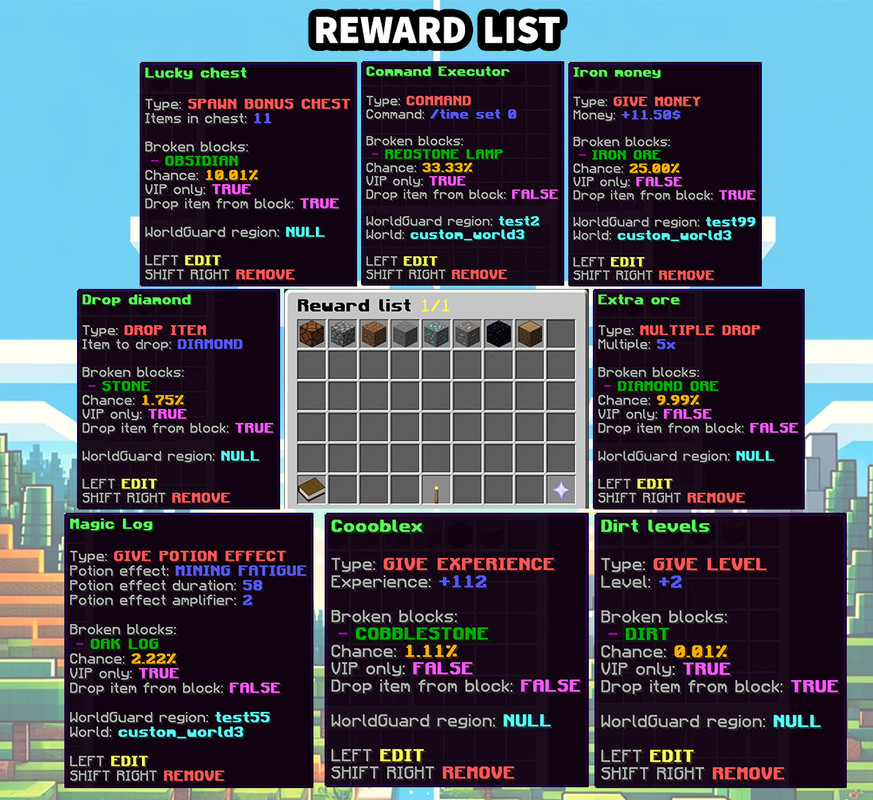
✅ Reward List & Preview GUI
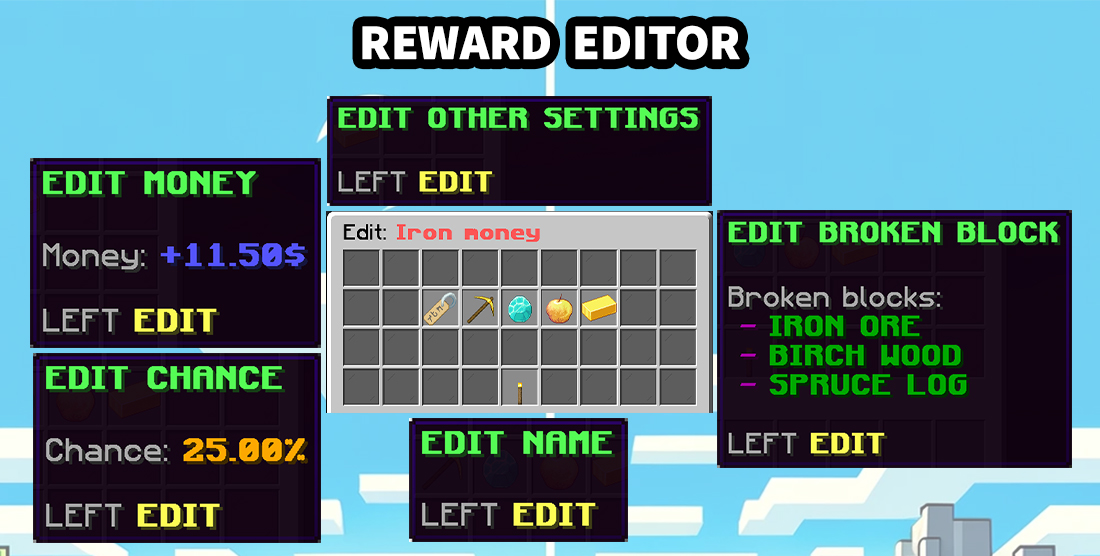
✅ Complete Reward Editor
Edit an existing reward whenever you need to; there is no need to recreate it. Depending on its type, you can change:
✅ Effects, Sounds & Messages
✅ Commands & Administration
Open
Tab completion helps you enter the plugin’s subcommands.
✅ Integrations & Compatibility
Rewards can give items, money, XP, potion effects and enchantments. They can also run commands, repair tools, replace or transform blocks, mine connected ore veins and scan nearby terrain. Use Mining Shield for temporary protection or Auto Pickup to send mined drops straight to the player’s inventory.
✅ Reward Creation & Management
- GUI-Based Management – Create, edit, preview, sort and remove rewards directly from inventory menus.
- Step-by-Step Reward Creator – Configure every reward through a guided creator with separate steps for:
- Reward name
- Reward type
- Trigger blocks
- Reward-specific settings
- Activation chance
- VIP access
- Disabled worlds
- WorldGuard regions
- Normal block drops
- Reward name
- Separate Reward Files – Every reward is stored in its own file inside the
Rewardsfolder.
- Safe Reward Names – Reward names are validated before rewards are created, renamed, loaded or deleted.
- Automatic Configuration Updates – Missing configuration and message entries are added during startup when required.
✅ 20 Reward Types
Choose from the following reward types:
- Drop Item – Give the player an additional configurable item.
- Multiple Drop – Give multiple copies of the mined block's item.
- Give Money – Reward the player with server currency through Vault.
- Give Level – Grant one or more experience levels.
- Give Experience – Grant a configurable amount of direct experience.
- Spawn Bonus Chest – Spawn a chest containing configured reward items.
- Give Potion Effect – Apply a selected potion effect for a configured duration.
- Command – Execute one or more server commands when the reward activates. Supports placeholders such as
%PLAYER%and%BLOCK%.
- Repair Tool – Repair the tool used to mine the block.
- Explosion Reward – Create an explosion at the mined block's location.
- Renew Block – Replace the mined block with the same block type.
- Cycle Ore – Replace the mined block with a randomly selected configured ore.
- Enchantment Reward – Add a selected enchantment and level to the player's mining tool.
- Give Random Effect – Give the player one random effect from a configured list.
- Vein Burst – Automatically mine connected ore blocks with configurable radius and block limits.
- Golden Apple – Apply configurable regeneration, absorption and food-related benefits based on the golden apple reward.
- Ore Smelter – Replace raw ore drops with ingots. Fortune, furnace experience and visual effects can be configured. Supports iron, gold, copper and ancient debris.
- Prospector Pulse – Scan loaded terrain for selected ores and show the player a private particle compass. Radius, duration, target ore groups, maximum target count and hidden-only mode are configurable.
- Mining Shield – Grant a temporary, charge-based shield with configurable charges, duration, damage reduction and visual effects. Repeated activations add charges up to a safety limit and keep the stronger protection.
- Auto Pickup – Send the mined block's drops directly to the player's inventory. Optionally collect block experience instantly, choose whether excess items drop at the player or the mined block, and enable pickup effects. Includes dedicated creator and editor settings.
✅ Reward Conditions & Chance Control
- Multiple Trigger Blocks – Assign several block types to one reward instead of creating a separate reward for every block.
- Individual Activation Chance – Configure the chance of every reward independently, from
0.01%to100%.
- Quick Chance Controls – Adjust the chance directly in the GUI using
0.01%,0.1%,1%and10%steps.
- Multiple Rewards Per Block – Assign several rewards to the same block, each with its own chance and restrictions.
- Normal Drop Control – Decide whether the mined block should still drop its normal item after a reward activates. Auto Pickup keeps normal drops enabled so it can collect them.
✅ Global Settings & Anti-Abuse Protection
- Global Reward Switch – Enable or disable reward processing for regular players without deleting configured rewards.
- Administrative Bypass – Allow authorized staff to continue receiving rewards while the global reward switch is disabled.
- Placed Block Protection – Prevent players from placing and repeatedly breaking their own blocks to farm rewards.
- Persistent Protection Database – Player-placed block locations are stored in SQLite and remain protected after server restarts.
✅ Reward Safety & Performance Controls
- Rewards Per Block Limit – Limit how many rewards can activate from one block break. The default is
3, configurable throughSafety.MaxRewardsPerBlockBreak.
- Player Trigger Cooldown – Optionally set a delay in ticks between successful reward triggers for each player. Disabled by default.
- Creative Mode Control – Skip reward processing for Creative players by default, with a configurable switch.
- Vein Burst Limits – Combine each reward's radius and block limit with a global maximum of mined blocks. Extra blocks trigger break events so protection plugins can cancel them, without starting recursive reward chains.
- Explosion Controls – Configure the maximum explosion power and whether reward explosions can damage blocks. Block damage is disabled by default.
- Enchantment Limits – Use normal enchantment level limits by default, with an optional setting for unsafe enchantments.
- Command Restrictions – Set a maximum command length and blocked command prefixes for command rewards.
- Reward Validation – Skip rewards with missing or invalid required values. Runtime errors during reward execution are logged and the failed reward is skipped.
✅ World Restrictions
- Global Disabled Worlds – Disable mining rewards across selected worlds from the global settings.
- Per-Reward Disabled Worlds – Disable an individual reward in selected worlds using a paged GUI.
✅ WorldGuard Region Support
With WorldEdit and WorldGuard installed, you can limit rewards by region:
- Enabled Regions – Allow a reward to activate only inside selected WorldGuard regions.
- Disabled Regions – Prevent a reward from activating inside selected regions.
- Region Management GUI – Add, remove and reset enabled or disabled regions directly from inventory menus.
✅ Reward Permissions
- Optional VIP Rewards – Mark individual rewards as permission-protected.
- Global Permission Requirement – Require a permission for every configured reward.
- All-Rewards Permission – Grant access to all permission-protected rewards with
miningrewards.reward.all.
- Individual Reward Permission – Grant access to one selected reward with
miningrewards.reward.<reward_name>.
- Separate Administration Permissions – Control access to the main menu, reward list, preview, creator, editor, removal tools and global settings independently.
✅ Reward List & Preview GUI
- Paged Reward List – Browse all configured rewards in an organized inventory menu.
- Detailed Preview – View the reward type, trigger blocks, chance, VIP status, normal-drop setting, region restrictions and reward-specific values.
- Sorting – Switch between alphabetical A–Z and Z–A order.
- Quick Editing – Open the complete editor with Left Click.
- Safe Removal – Remove a reward using a protected Shift + Right Click confirmation.
✅ Complete Reward Editor
Edit an existing reward whenever you need to; there is no need to recreate it. Depending on its type, you can change:
- Reward name
- Trigger blocks
- Activation chance
- Reward-specific values
- VIP requirement
- Normal block drops
- Disabled worlds
- WorldGuard regions
✅ Effects, Sounds & Messages
- Activation Effects – Display configurable visual effects when a reward activates.
- Activation Sounds – Play a configurable sound after a successful reward.
- Player Messages – Send reward information to the player who triggered the reward.
- Global Broadcasts – Announce successful rewards to other online players.
- Console Messages – Log successful reward activations in the server console.
- Independent Controls – Enable or disable player messages, global broadcasts and console messages separately.
- Editable Messages – Customize prefixes, messages, values and placeholders in
Messages.yml.
✅ Commands & Administration
Open
/miningrewards or its alias /mr to reach the main menu and administration tools:/miningrewards
/miningrewards list
/miningrewards create
/miningrewards create <reward_name>
/miningrewards edit <reward_name>
/miningrewards remove <reward_name>
/miningrewards globalsettings
Tab completion helps you enter the plugin’s subcommands.
✅ Integrations & Compatibility
- Vault Economy – Money rewards become available when Vault and a compatible economy provider are installed.
- WorldEdit & WorldGuard – Optional region-based reward restrictions.
- SQLite – Persistent storage for placed-block protection.
- Spigot and Paper – Designed for servers using Spigot/Paper API 26.2 and Java 25.