

Plugin description
MysteryZones adds temporary zones that appear at random in your Minecraft world.
While exploring, players can discover zones that offer rewards, provide protection, change how they move, spawn threats, teleport them or grant temporary abilities. Others bring a little unpredictability to their adventures.
Particle borders make each active zone easy to spot. The zone gradually shrinks until its time runs out.
✅ 28 DIFFERENT ZONE TYPES
Mix simple rewards with zones that keep affecting players for as long as they stay inside.
✅ ZONES & CONFIGURATION
Configure each zone independently to suit the gameplay you want.
✅ SMART ZONE GENERATION
✅ GLOBAL SETTINGS
Adjust the whole zone system from the Global Settings GUI, without repeatedly opening configuration files.
Configuration Reload – Reload plugin configuration directly from the GUI or with a command.
✅ WORLD & REGION CONTROL
✅ PARTICLES & VISUAL EFFECTS
✅ PLAYER ACTIVATION SYSTEM
✅ CONFIGURED ZONES MANAGEMENT
Browse and manage all zones loaded from
✅ ACTIVE ZONES MANAGEMENT
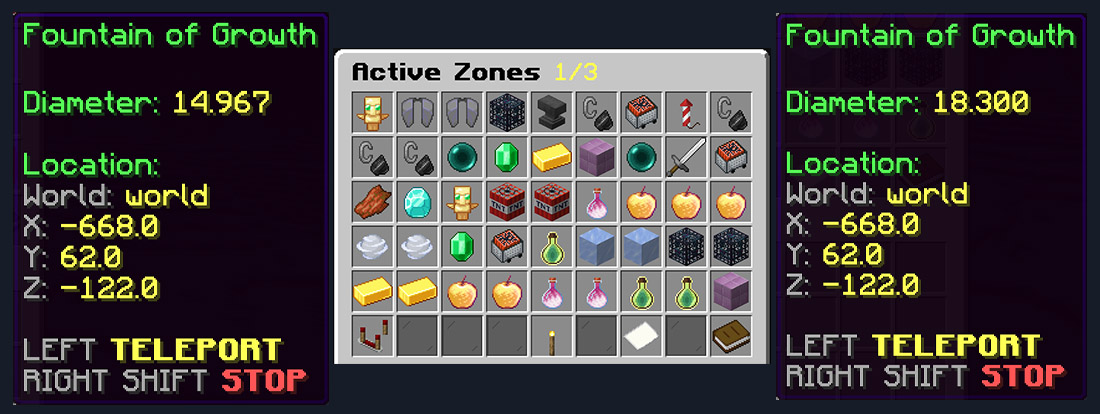
Keep track of the zones currently active in the world and manage them from one place.
✅ REWARDS & INTEGRATIONS
While exploring, players can discover zones that offer rewards, provide protection, change how they move, spawn threats, teleport them or grant temporary abilities. Others bring a little unpredictability to their adventures.
Particle borders make each active zone easy to spot. The zone gradually shrinks until its time runs out.
- Automatic Zone Generation – Zones automatically appear around active players.
- Dynamic Shrinking – Every zone starts at its configured size and becomes smaller over time.
- 28 Supported Zone Types – Rewards, traps, movement mechanics, temporary abilities and special interactive zones.
- 81 Ready-to-Use Zones – The default
Zones.ymlcontains 81 prepared configurations.
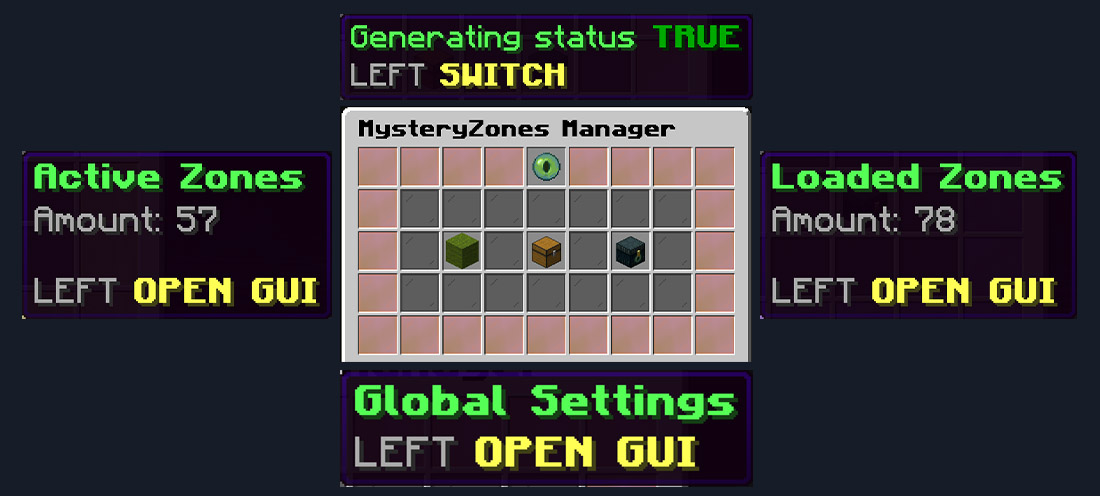
- Complete GUI Management – Manage active zones, configured zones and most important settings directly in-game.
- Multi-World Support – Generate zones across multiple enabled worlds.
- WorldGuard Integration – Allow or block individual zones inside selected regions.
- Vault Integration – Reward players with server currency.
✅ 28 DIFFERENT ZONE TYPES
Mix simple rewards with zones that keep affecting players for as long as they stay inside.
- Burn Zones – These zones set the player on fire for a set duration, making survival a challenge.
- Command Zones – Entering these zones executes a server command, which can perform actions like granting rewards, teleporting players, or any custom script defined by the administrator.
- Currency Add Zones – Players entering these zones are rewarded with in-game currency.
- Damage Zones – A risky zone where players take damage upon entering. Perfect for dangerous traps.
- Equipment Repair Zones – Entering these zones instantly restores every damaged item in your inventory and armor to full durability, sending you back into battle with pristine, fully repaired gear.
- Explosion Zones – Players entering these zones trigger an explosion that may cause damage, ignite fire, or even break blocks, depending on the zone's settings.
- Experience Zones – Players entering these zones will be rewarded with a specific amount of experience points (XP), helping them level up or enhance their progress.
- Instant Kill Zones – The most dangerous zone type, where entering means immediate death for the player.
- Heal Zones – Step into these zones to receive a set amount of healing, restoring the player's health instantly.
- Freeze Trap Zones – Entering these zones temporarily freezes the player's walking movement for a configurable duration.
- Launch Zones – Stepping into these zones propels players high into the air with a strong upward force, creating thrilling moments or helping them reach higher locations.
- Item Drop Zones – These zones drop valuable items like diamonds, emeralds, or fish, rewarding players who find them.
- Item Give Zones – A reward-based zone where players receive a set amount of specific items.
- Item Removal Zones – These zones remove random items from a player's inventory, making them a potential loss for unprepared players.
- Items Rain Zones – A predefined pool of items rains from the sky at set intervals, and the shower stops the moment you leave the area.
- Slippery Zone – Increases the player's movement speed drastically, making it hard to control.
- Potion Effect Zones – Players entering these zones will be affected by a specific potion effect (e.g., poison, speed, or regeneration).
- Teleport Zones – These zones instantly teleport the player to a random location within a specified radius, adding an element of unpredictability and excitement to the gameplay.
- Lightning Strike Zones – These zones summon a lightning strike upon entry, inflicting damage and providing a dramatic environmental effect.
- Mob Spawn Zones – Dangerous zones where hostile mobs like zombies, skeletons, or blazes spawn, ready to attack players.
- Anti Gravity Zone – Temporarily changes the player's movement and creates a low-gravity effect.
- Mirror Control Zone – Temporarily reverses player movement, creating a difficult control challenge.
- Empty Stomach Zone – Gradually drains the player's hunger while they remain inside.
- Experience Spring – Continuously grants XP while the player stays inside the zone, with configurable intervals and limits.
- Golden Apple Zone – Periodically applies configurable Golden Apple-style regeneration and absorption effects.
- Flight Grant Zone – Temporarily gives players the ability to fly.
- God Mode Zone – Gives temporary protection from damage.
- Gravity Well Zone – Continuously pulls players toward the center. The pull becomes stronger farther from the center, and reaching the core can damage the player or launch them upward.
✅ ZONES & CONFIGURATION
Configure each zone independently to suit the gameplay you want.
- 81 Default Zones – Three ready-to-use examples are included for every default zone type.
- Individual Zone Status – Enable or disable any configured zone without removing it.
- Custom Appearance – Select the particle used to visualize each zone.
- Custom Size & Duration – Configure zone diameter and lifetime.
- Spawn Weight – Control how frequently individual zones are selected for automatic generation.
- Minimum Players – Require a specific number of online players before a zone can generate.
- Maximum Active Instances – Limit how many copies of a specific zone may exist simultaneously.
- Entry Cooldown – Configure how quickly a player can trigger the same zone again.
- Vertical Activation Range – Prevent players far above or below a zone from activating it.
- Type-Specific Settings – Damage, XP, items, mobs, flight duration, gravity strength, commands, explosions and many other values are configurable depending on the zone type.
- Automatic Configuration Updates – Older configurations receive newly required settings while supported existing values are preserved.
- Default Zone Reset – Restore the default
Zones.ymlusing a protected confirmation action.
✅ SMART ZONE GENERATION
- Player-Based Placement – Automatic zones generate around areas where players are actually active.
- Minimum Player Requirement – Automatic generation can wait until enough players are online.
- Global Active Zone Limit – Limit the maximum number of simultaneously active zones.
- Per-World Zone Limit – Prevent one world from receiving too many zones.
- Collision Protection – Prevent new zones from overlapping currently active zones.
- Minimum Zone Distance – Configure the minimum spacing between zones.
- Player Distance Protection – Control how close new zones may appear to players.
- Optional Player-Position Generation – Decide whether zones may appear directly where a player is standing.
- Safe Surface Checking – Generation can require a valid surface before placing a zone.
- World Border Protection – Location searches can respect the world's border.
- Chunk Loading Protection – Prevent the generator from loading unused chunks only to search for a location.
- Generation Retry System – Failed attempts are automatically retried after a configurable delay.
- Automatic Idle Pause – Generation stops when there are no eligible players and resumes automatically later.
- Spectator Protection – Spectator players can be ignored during generation and activation checks.
- Manual Generation – Administrators can instantly generate any configured zone at their location.
✅ GLOBAL SETTINGS
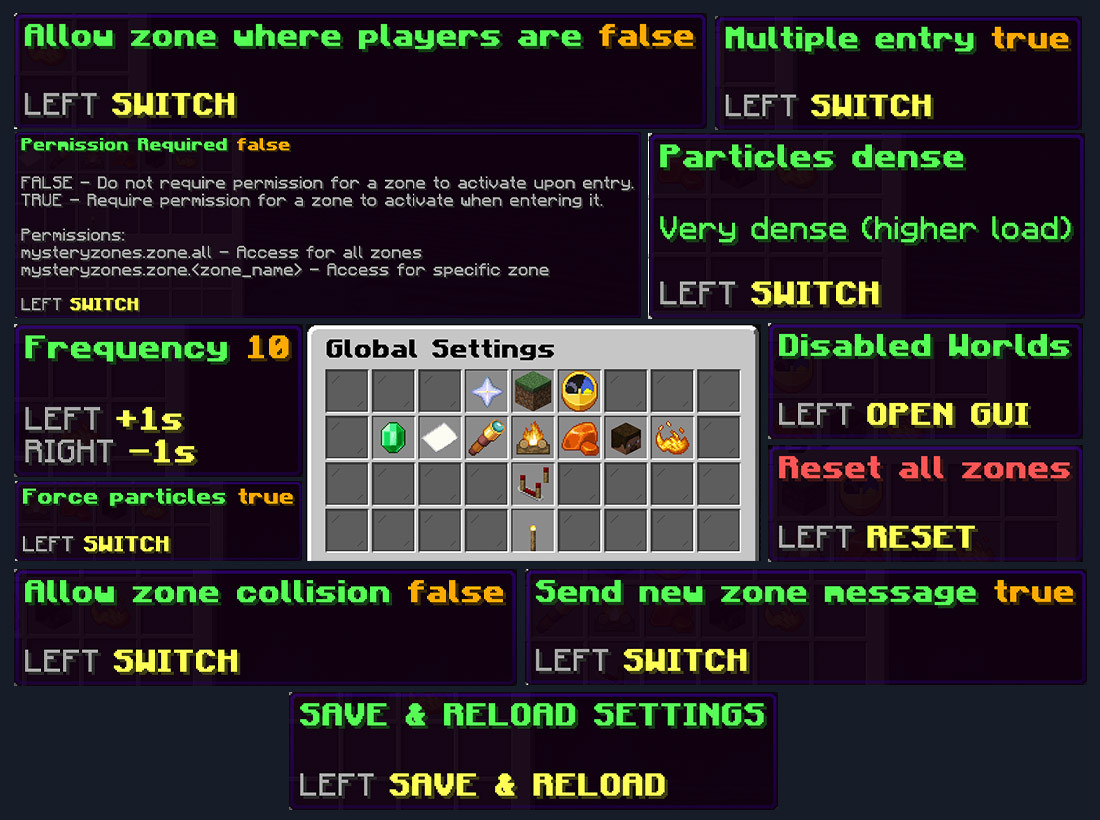
Adjust the whole zone system from the Global Settings GUI, without repeatedly opening configuration files.
- Automatic generation status
- Generation frequency
- Minimum online players
- Maximum active zones
- Maximum active zones per world
- Generation retry delay
- Permission requirement
- Zone generation messages
- World-only announcements
- Global disabled worlds
- Zone collision rules
- Distance from players
- Location search limits
- Safe surface requirements
- World border protection
- Chunk loading behavior
- Default entry cooldown
- Default vertical activation range
- Multiple-entry behavior
- Ignore spectators
- Horizontal particle density
- Vertical particle density
- Forced particle rendering
- Entry effects
- Particle and player-check performance settings
Configuration Reload – Reload plugin configuration directly from the GUI or with a command.
✅ WORLD & REGION CONTROL
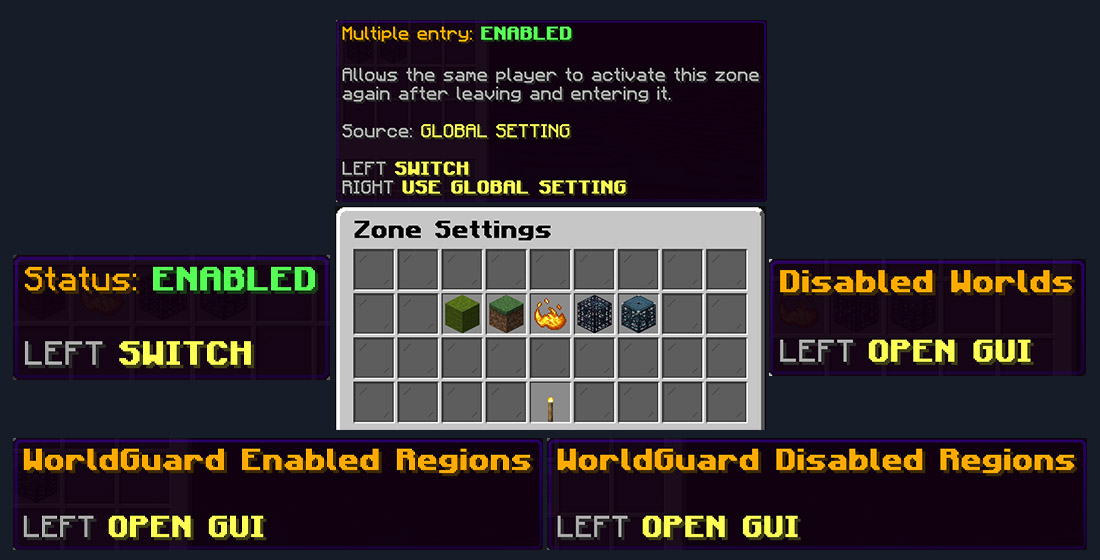
- Global Disabled Worlds – Completely disable MysteryZones generation in selected worlds using a paged GUI.
- Per-Zone Disabled Worlds – Prevent only a specific configured zone from appearing in selected worlds.
- WorldGuard Integration – Integrate zones with existing WorldGuard regions.
- Enabled Regions – Allow a zone to generate only inside selected WorldGuard regions.
- Disabled Regions – Prevent a zone from generating inside selected protected regions.
- Region Management GUI – Select allowed and blocked regions directly from inventory menus.
✅ PARTICLES & VISUAL EFFECTS
- Dynamic Zone Walls – Active zones are displayed using animated particle rings and vertical effects.
- Terrain-Aware Rendering – Particle visualization adapts to different terrain heights instead of appearing as a completely flat circle.
- Solid Block Protection – Particle rendering avoids unnecessary effects inside solid terrain.
- Configurable Particle Density – Balance visual quality and server performance.
- Forced Particle Rendering – Optionally increase the particle visibility range.
- Entry Effects – Successfully activating a zone can create particles, sounds and additional visual feedback.
- Performance Controls – Player checking, particle rendering and terrain refresh intervals can be adjusted separately.
✅ PLAYER ACTIVATION SYSTEM
- Reliable Zone Detection – Players are detected across the horizontal area of the zone.
- Single Entry Mode – A player may activate an active zone only once.
- Multiple Entry Mode – Allow players to leave and re-enter the same zone to trigger it again.
- Per-Zone Entry Override – Individual zones can override the global multiple-entry behavior.
- Entry Cooldowns – Prevent repeated activation spam.
- Vertical Range Detection – Stop players far above or below the actual zone from triggering it.
- Continuous Zone Effects – Some zones continue affecting the player while they remain inside, including Gravity Well, Experience Spring and hunger-based zones.
- Effect Retry Protection – Temporary failures do not unnecessarily lock the player out of the zone.
✅ CONFIGURED ZONES MANAGEMENT
Browse and manage all zones loaded from
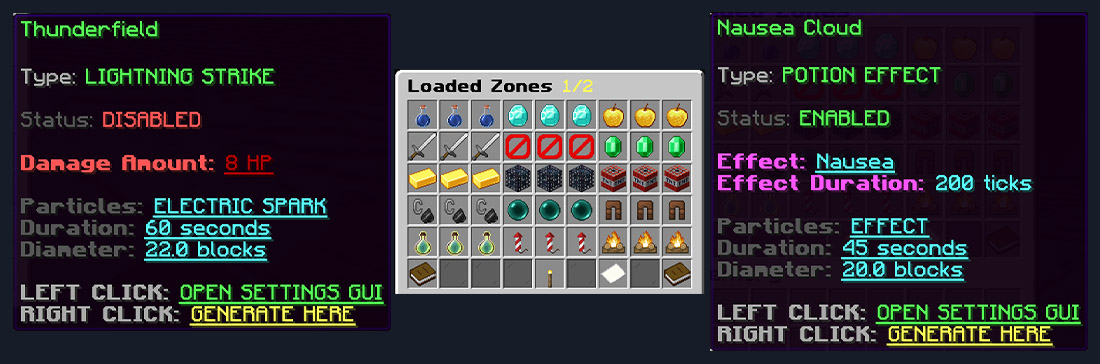
Zones.yml.- Loaded Zones Browser – Browse all configured zones using a paged inventory GUI.
- Detailed Zone Information – Quickly check type, status and important settings.
- Zone Sorting – Sort zones by:
- Name A → Z
- Name Z → A
- Zone type
- Enabled / Disabled status
- Name A → Z
- Quick Settings – Left Click a zone to open its settings.
- Manual Generation – Right Click a zone to generate it immediately at your location.
✅ ACTIVE ZONES MANAGEMENT
Keep track of the zones currently active in the world and manage them from one place.
- Active Zones GUI – Browse every currently running zone.
- Live Information – View:
- Zone name
- Current shrinking radius
- World
- Coordinates
- Zone name
- Live GUI Refresh – Zone information automatically updates while the GUI is open.
- Teleport to Zone – Left Click an active zone to teleport directly to it.
- Stop Zone – Shift + Right Click removes an active zone using a protected confirmation system.
✅ REWARDS & INTEGRATIONS
- Vault Economy – Currency zones can automatically add money to a player's economy balance.
- WorldGuard – Restrict individual zones using existing WorldGuard regions.
- Console Commands – Command Zones can execute configurable console commands.
- Command Placeholder – Use
%PLAYER%to automatically insert the activating player's name.